Feature
Fast Restock Pro
A one-page reorder list of a company's most-bought products, so restocking supplies doesn't mean re-browsing your whole catalog.
What it does
Fast Restock looks at everything a company's team has ordered before and shows the products they buy most, with how many times they've ordered each one and when. Anyone on the team can tick the ones they need, adjust the quantity, and add them all to the cart in one go.
Why you'd use it (or rather, why your customers will)
Most B2B reordering is routine — the same office supplies, the same packaging, the same replacement parts, month after month. Fast Restock turns that into a couple of clicks instead of a search-and-add ritual through your shop.
How to use it
It's available to every team member — not just Managers and Admins — from My Account > Fast Restock. There's nothing to configure; it works automatically once a company has order history.
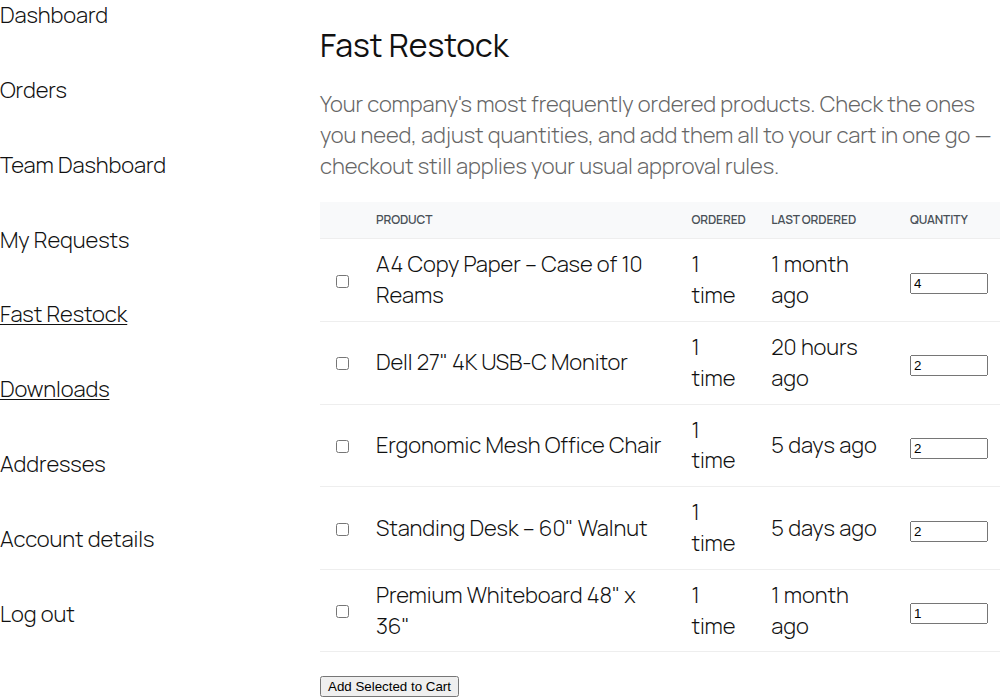
Check what you need
Tick the box next to each product you want to reorder.Adjust quantities
Each row has its own quantity field, pre-filled with a sensible default.Add and check out
Click Add Selected to Cart, then check out normally.
Important to know
Edge cases
- No order history yet — a brand-new company with no completed orders simply won't have anything to show here yet. There's nothing to fix; it fills in naturally as the company orders.
- A product was discontinued or deleted — CrewCommerce still shows it in the list (so the ordering history isn't lost), labeled "Product #123 (no longer available)" with an Unavailable badge, and it can't be added to the cart.