TL;DR
WooCommerce can already do this by hand. Open the order in WP Admin and make sure its status is Pending payment. Then either copy the “Customer payment page” link at the top of the order, or choose “Send order details to customer” from Order actions, which emails the customer a link to pay. If the approval comes from a manager at the customer’s company, CrewCommerce does this for you: once the order is approved, the buyer is emailed a link to pay and gets a Pay Now button in their account.
Approving first and charging second is the safer order of events. A rejected order never touches anyone’s card, and nobody has to process a refund. The catch is getting the customer back to pay once the order is approved. Here’s how to do that with WooCommerce alone, and how to automate it.
Doing it by hand in WooCommerce
WooCommerce has a payment page for any order that still needs paying. To send someone there:
- In WP Admin, open the order under WooCommerce › Orders.
- Set the status to Pending payment if it isn’t already, and save.
- Either copy the Customer payment page link near the top of the order and send it however you like, or open Order actions, choose Send order details to customer and click the arrow. The customer gets an email with the order and a link to pay.
The customer follows the link, picks a payment method and pays. The order then moves on to Processing as usual.
Two things that catch people out
- The customer may have to log in. If the order belongs to a customer account, WooCommerce asks them to sign in as that customer before it shows the payment form. That protects the order, but it confuses people who forgot they had an account.
- Unpaid orders can be cancelled automatically. WooCommerce’s Hold stock setting cancels unpaid checkout orders after a set number of minutes. If orders wait for approval before payment, whatever holds them needs to keep that timer from cancelling them.
Doing this by hand is fine for the odd order. It gets tedious once approvals are a normal part of how a customer buys.
Doing it automatically with CrewCommerce
CrewCommerce is a plugin I make for stores whose customers are companies. A buyer’s order can need approval from a manager at their own company. Nothing is charged while it waits. When the manager approves it, what happens next depends on how it’s being paid:
| Payment method | After approval |
|---|---|
| Card or another online gateway | Goes to Pending payment. The buyer is emailed a link to pay, and a Pay Now button appears on the order in My Requests. |
| Bank transfer or check | Goes to On hold, awaiting payment, as it would have at checkout. |
| Cash on delivery | Goes to Processing, as it would have at checkout. |
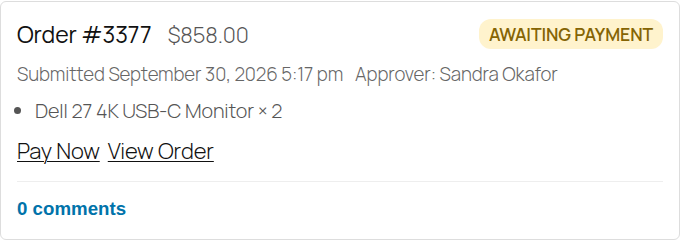
The buyer is already signed in to their own account, so the login step isn’t a surprise. Approved orders waiting for payment are also kept out of WooCommerce’s Hold stock timer, so they stay open until the buyer pays or you cancel them.
If you use an invoice or purchase-order gateway, it’s treated like online payment by default: the buyer gets the link and chooses how to pay on WooCommerce’s payment page. A developer can change that with a filter, which is described in Advanced Usage.
The full flow, from the order being held to the payment, is in Approval Workflows.
Questions people ask
Where is the payment link in WooCommerce?
Open the order in WP Admin. While its status is Pending payment, a “Customer payment page” link appears near the top of the order. Order actions › Send order details to customer emails the customer the same link.
Why does the customer have to log in to pay?
If the order belongs to a customer account, WooCommerce asks the customer to sign in as that account before showing the payment form, so nobody else can pay or view it.
Why was my unpaid order cancelled?
WooCommerce’s Hold stock setting cancels unpaid checkout orders after a set number of minutes. Orders waiting for approval or payment need to be kept out of that timer. CrewCommerce does this for approved orders waiting for payment.
Can I resend the payment link?
Yes. Use Order actions › Send order details to customer on the order in WP Admin, while it’s still Pending payment.