TL;DR
WooCommerce has an “Order again” button on completed orders, which puts the items from that one order back in the cart. B2B buyers usually need something different: a list of everything their company orders regularly, where they can tick what they need, set quantities and add it all at once. That comes from a plugin. In CrewCommerce it’s called Fast Restock. It builds the list from the whole team’s past orders and is available to everyone on the team under My Account.
Most business ordering is repetitive. The same paper, the same gloves, the same spare parts, every few weeks. Making buyers search your catalogue for each item every time is slow for them, and it’s one more reason for them to phone or email the order in instead.
What WooCommerce gives you: “Order again”
When a customer opens a completed order in their account, WooCommerce shows an Order again button. It adds that order’s items to the cart with the same quantities.
That’s handy for a shopper who buys the same basket twice. For a business customer it falls short:
- It works one order at a time. A restock usually mixes items from several past orders.
- It only shows on completed orders. An order that’s still processing can’t be repeated.
- It only covers the person’s own orders. If a colleague usually orders the toner, it isn’t in your history.
- It’s all or nothing. You get the whole order, then remove what you don’t need from the cart.
What B2B buyers actually want
When buyers describe this, they usually describe a list:
- every product the company has ordered before, in one place;
- how often each one is ordered, and when it was last bought;
- a quantity box on each row;
- one button to add the selected items to the cart.
How Fast Restock does it
CrewCommerce, a plugin I make for stores whose customers are companies, includes this as Fast Restock. Anyone on a company’s team finds it under My Account › Fast Restock. There’s nothing to set up: it fills in from the company’s order history.
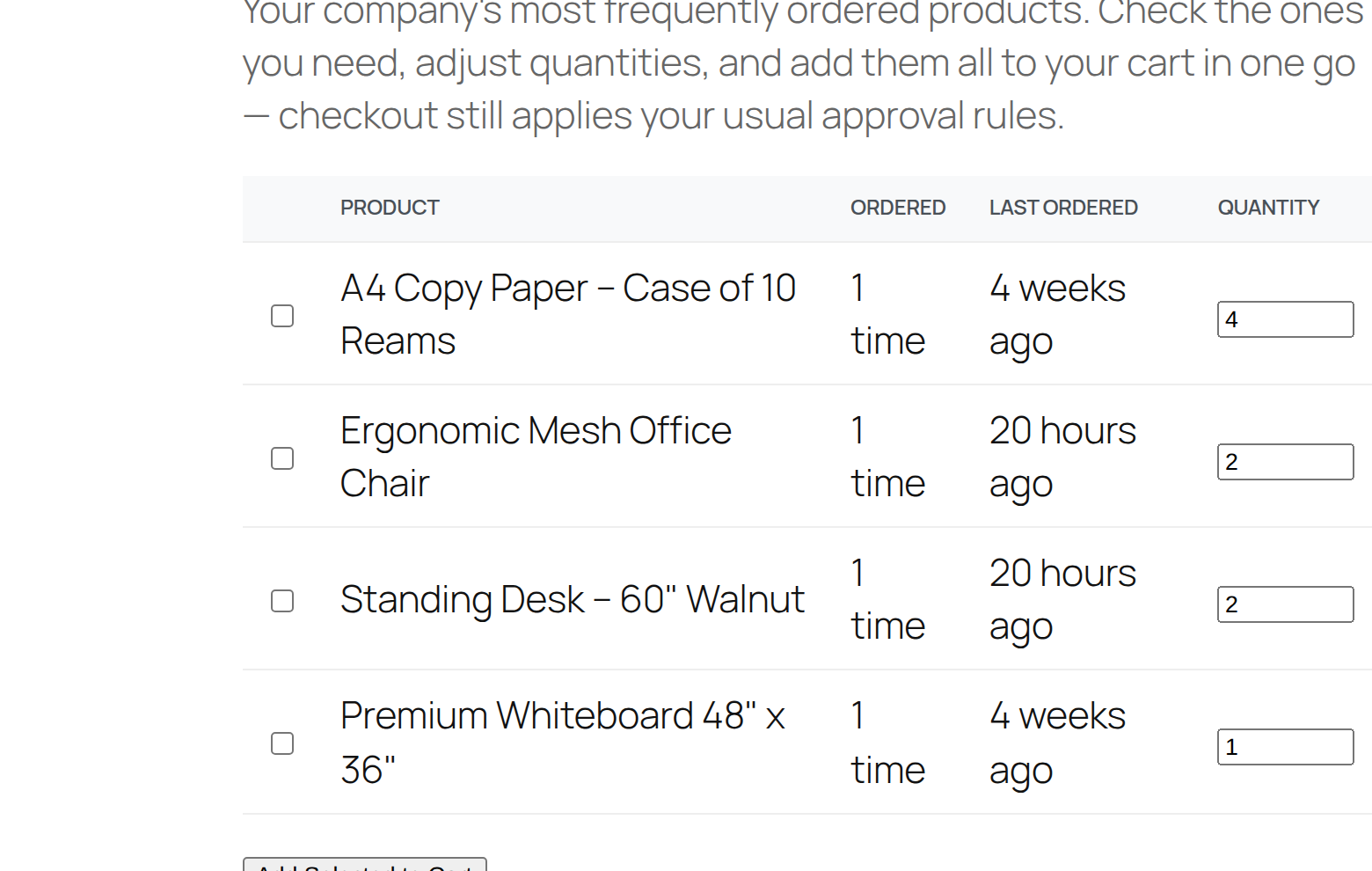
- Tick the products you need.
- Adjust the quantities.
- Click Add Selected to Cart, then check out as usual.
Because the list comes from the whole team’s orders, a new person sees what the company normally buys from their first day.
Rules still apply
Fast Restock only speeds up filling the cart. Checkout still applies the company’s approval rules and spending limits, so a large restock can still need a manager’s approval. The approvals post explains how that works.
Products you no longer sell
If a product has been discontinued or deleted, it stays on the list so the history isn’t lost. It’s marked as unavailable and can’t be added to the cart.
The Fast Restock documentation has the details.
Questions people ask
Does WooCommerce have a reorder button?
Yes. Completed orders show an Order again button in My Account, which adds that order’s items back to the cart. It works one order at a time and only for the customer’s own completed orders.
Can buyers reorder products a colleague usually orders?
With CrewCommerce’s Fast Restock, yes. The list is built from the whole company’s order history, not just the buyer’s own.
Do approval rules apply to restock orders?
Yes. Fast Restock only fills the cart. Checkout still applies the company’s approval rules and spending limits.