TL;DR
WooCommerce links every order to one customer account, and it doesn’t know when two accounts belong to the same company. So when several people at one customer need to order, you have three choices: share one login, give each person their own unconnected account, or add company accounts with a plugin. Only company accounts tell you who placed each order and let the customer decide who can spend what.
If you sell to businesses, you’ve probably had this email: “Can my colleague order on our account too?” It sounds like a small request. It isn’t, because WooCommerce was built around one shopper buying for themselves.
Take a 20-person architecture firm. The office manager orders paper and toner every month. Someone in IT orders monitors when a new hire starts. One of the partners wants to know about anything expensive before it’s bought. All three of them are your customer, but WooCommerce sees them either as three strangers or as one person.
Here’s how each way of handling that plays out.
Option 1: everyone shares one login
The company creates one account, often with an address like orders@ or office@, and passes the password around.
It works on day one and needs nothing from you. The problems show up later:
- You can’t tell who ordered what. Every order comes from the same name. When something goes wrong, you and the customer are both guessing.
- The password spreads. It ends up in a shared document or on a sticky note. When someone leaves the company, the password should change for everyone. Usually it doesn’t.
- There are no limits. Whoever has the login can order anything, in any amount.
- Addresses and history get mixed up. People ship to whatever address was used last.
For a two-person customer who orders twice a year, a shared login is fine. Beyond that, it creates support work for you and risk for them.
Option 2: each person gets their own account
Each buyer registers on your store with their own email. That fixes the password problem, and everyone gets their own order history.
What it doesn’t fix is that WooCommerce still has no idea these people work together. In practice:
- Nobody at the company can see what their colleagues have ordered.
- The person who pays the bills has no view of what the team is spending.
- You can’t set a rule for one customer, such as “orders over $1,000 need a manager’s OK”, because there’s no company to attach it to.
- You end up grouping accounts yourself, usually by email domain, in a spreadsheet.
Separate accounts are a reasonable middle ground if each of your business customers has only one buyer. Once they have several, the gaps start to matter.
Option 3: company accounts
A company account groups the people from one customer under a single company in your store. Each person still signs in as themselves, but your store now knows they belong together, and the customer can decide what each person is allowed to do.
WooCommerce doesn’t include company accounts, so they come from a plugin. Plugins in this area differ a lot, so check these points before you choose one:
- Individual logins. Each person signs in as themselves, and every order shows who placed it.
- Roles. At the very least, someone who orders and someone who can approve orders and manage the team.
- Who does the setup. Can the customer add their own people, or do you have to create every account by hand?
- Rules per company. When does an order need sign-off, and can that be different for each customer?
- Spending limits. Can the customer cap what one person spends in a month?
- Payment timing. If an order needs approval, is the card charged before or after someone approves it?
- A record. Can you and the customer see who ordered, who approved and when?
How CrewCommerce handles it
I should say up front that I make CrewCommerce, a company-accounts plugin for WooCommerce. Here’s how it answers the list above, so you can compare it with anything else you’re considering.
Each customer company has its own team, and everyone on it has one of three roles:
| Role | What they can do |
|---|---|
| Requester | Shops and places orders. Orders that match your rules wait for approval. |
| Manager | Everything a Requester can do, plus approving orders and managing the team. |
| Admin | Everything a Manager can do. Each company has exactly one Admin. |
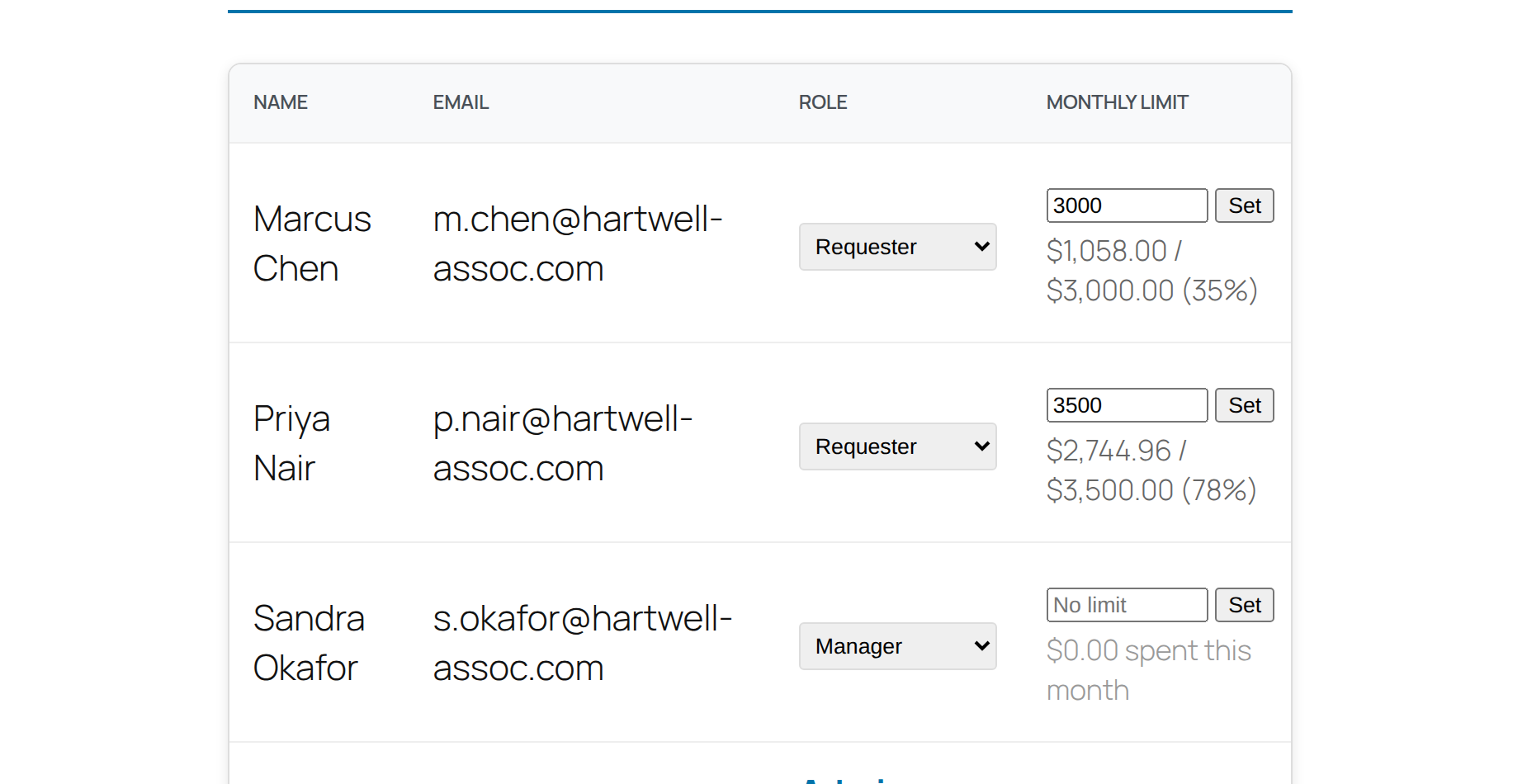
You can create a company and invite people from WP Admin, but you don’t have to. A Manager or Admin can invite colleagues by email from their account page, or share the company’s private join link. Join requests wait for the company’s Admin to approve them, so having the link isn’t enough to get in.
You set the approval rules as the store owner: an order value above which a Manager has to approve, and product categories that always need approval. Any company can have its own threshold. Managers and Admins can give each person a monthly spending limit. Nothing is charged while an order waits for approval, and if your store takes cards, the buyer gets a link to pay once it’s approved.
The Team Accounts documentation covers the setup step by step.
Which option is right for you?
- Each business customer has one buyer: separate accounts are enough.
- Several people order for the same customer, and nobody needs to control it: separate accounts work, but expect questions like “what did my team order last month?” that you can’t easily answer.
- Several people order, and the customer wants a say in what gets bought: you need company accounts.
The shared login is the one to move away from. It’s common because it takes no effort, but it costs both of you more than it saves.
Questions people ask
Does WooCommerce support several users on one customer account?
Not in a useful way. A WooCommerce customer account belongs to one person. Several people can sign in with the same username and password, but every order then looks like it came from that one person. To give each person their own login under one company, you need a plugin that adds company accounts.
What’s the difference between sub-accounts and company accounts?
Mostly the name. “Sub-accounts” usually means extra logins attached to a main customer account. “Company accounts” or “team accounts” usually means a company with several members, each with a role. Check what each plugin actually offers, such as roles, approvals and spending limits, rather than going by the label.
Can one person belong to two companies in CrewCommerce?
No. A person belongs to one company at a time. To move someone, remove them from their current company first, then invite them to the new one.
Do I need a full B2B suite to get company accounts?
Not necessarily. B2B suites bundle company accounts with wholesale pricing, quote requests, catalog visibility and much more. If your prices are already set up and what’s missing is how your customers’ teams buy, a focused plugin covers it with less to configure.