TL;DR
WooCommerce doesn’t have spending limits for individual buyers. With a company-accounts plugin like CrewCommerce, you or the customer’s manager can give each person a monthly limit. If an order would take them over it, checkout stops the order and tells them how much they have left. The total starts again on the 1st of each month and counts orders that are Processing, Completed or On hold.
This question comes up in two kinds of store. The first sells to other businesses, and a customer wants to cap what each of their staff can order. The second is an internal ordering site, where a company’s own employees order supplies or uniforms and each person gets an allowance. The answer is the same for both.
Approvals answer one question, one order at a time: should this order happen? Spending limits answer a different one: how much can this person spend in a month without anyone checking? A company with several buyers usually wants both.
Spending limits vs approval thresholds
They sound alike, but they behave differently:
| Spending limit | Approval threshold | |
|---|---|---|
| What it caps | One person’s total for the month | A single order |
| When it’s reached | Checkout stops the order | The order is placed and waits for a manager |
| Who’s involved | Nobody, it’s automatic | The customer’s Manager or Admin |
| Who sets it | You, or the customer’s Manager or Admin | You, for the whole store or per company |
A limit is a hard stop. An approval threshold is a question to a person.
How the two work together
CrewCommerce checks an order in this order. First, does it contain a product from a category that always needs approval? Then, is it at or above the approval threshold? Only when neither applies does the spending limit come in.
So a large order that needs approval isn’t blocked by the limit. It goes to the approver, who sees the total and decides. The limit catches the other case: lots of smaller orders that each stay under the threshold but add up.
An example. Marcus has a $3,000 monthly limit, his company’s approval threshold is $1,000, and he’s spent $2,500 so far this month.
- A $600 order is under the threshold, so it would normally go straight through. But it would take him to $3,100, so checkout stops it.
- A $1,200 order is over the threshold, so it’s placed and goes to his manager, who decides with the total in front of them.
How the month is counted
- The total starts again on the 1st of each calendar month. It isn’t a rolling 30 days.
- It includes the person’s orders that are Processing, Completed or On hold.
- Orders still waiting for approval don’t count yet, so a pending order can’t use up someone’s limit before anyone has agreed to it.
What the buyer sees
Anyone with a limit sees their progress on their account dashboard, so it doesn’t come as a surprise at checkout:
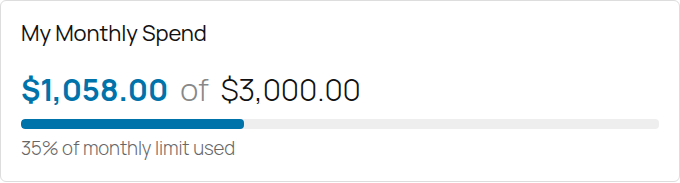
If an order would take them over, checkout shows their limit and how much they have left, and asks them to contact their manager. The order isn’t placed.
Who sets the limits
You can set them in WP Admin under CrewCommerce › Companies. The customer’s Managers and Admins can set them too, from Manage Team in their account, so day-to-day changes don’t have to go through you. Leave the field empty for no limit.
Limits apply to Requesters by default. If you include Managers in the approval rules under Settings, their limits apply as well. Admins are never limited.
For an internal ordering site, the setup is the same: put your staff in one company, make the people who order Requesters, and give each of them a monthly limit. Whoever signs off on bigger orders becomes a Manager.
There’s one exception to the limits. If a company has nobody who could approve orders, meaning no Manager or Admin, limits aren’t enforced, because “contact your manager” wouldn’t lead anywhere.
Picking a number
A limit works best as a backstop. Set it comfortably above what the person spends in a normal month. If their usual spending is close to the limit, they’ll keep getting blocked, and the limit will soon be raised or removed.
A simple way to start: look at the last few months of that person’s orders, take the highest month, and add some room. Leave single large orders to the approval threshold, which is better suited to them.
Keeping an eye on it as the store owner
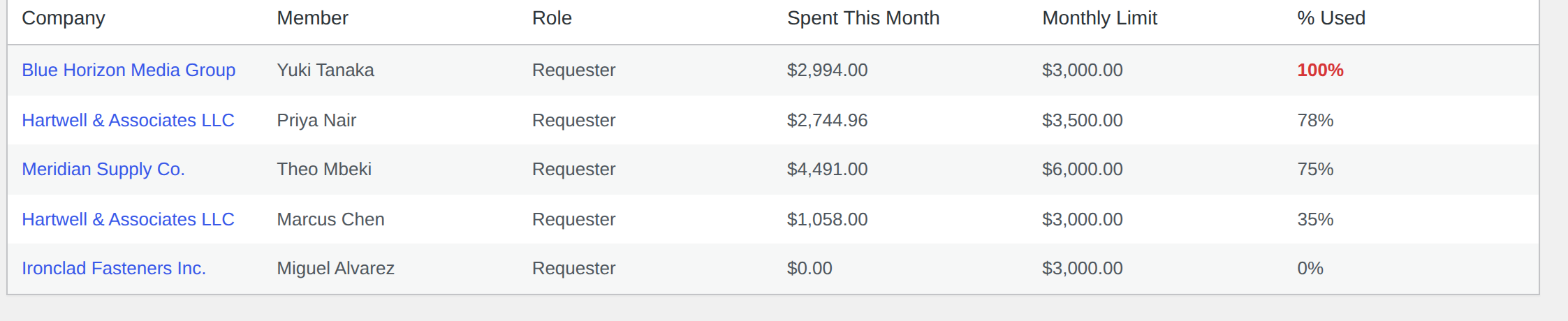
CrewCommerce › Spend Reports lists everyone who has a limit or has spent something this month, across all your customer companies, sorted by how much of their limit they’ve used. It’s a quick way to see who’s about to run into theirs.
The Spend Limits documentation has the full details.
Questions people ask
Does WooCommerce have spending limits per customer?
No. WooCommerce has no setting that caps how much a customer can spend. Per-person monthly limits come from a plugin such as CrewCommerce.
When does the monthly limit reset?
On the 1st of each calendar month. It isn’t a rolling 30-day window.
Do orders waiting for approval count toward the limit?
No. Only orders that are Processing, Completed or On hold count, so a pending order can’t use up someone’s limit before anyone has agreed to it.
Can a buyer go over their limit?
Not with an order that would otherwise go straight through, because checkout stops it. An order that needs approval anyway skips the limit check and goes to the buyer’s manager, who decides with the total in front of them.
Can I use this for an internal ordering site for my own staff?
Yes. Put your staff in one company, make the people who order Requesters, give each a monthly limit, and make whoever signs off on larger orders a Manager.